Blog›Guides

How to Make AI Character Reference Sheets (Prompts and Patterns)

A character reference sheet keeps the same character on-model across every image and video. Here are the best prompts in the catalog and the 6 patterns that make a sheet actually reusable.
How to Make AI Character Reference Sheets (Prompts and Patterns)

How to Make AI Character Reference Sheets (Prompts and Patterns)

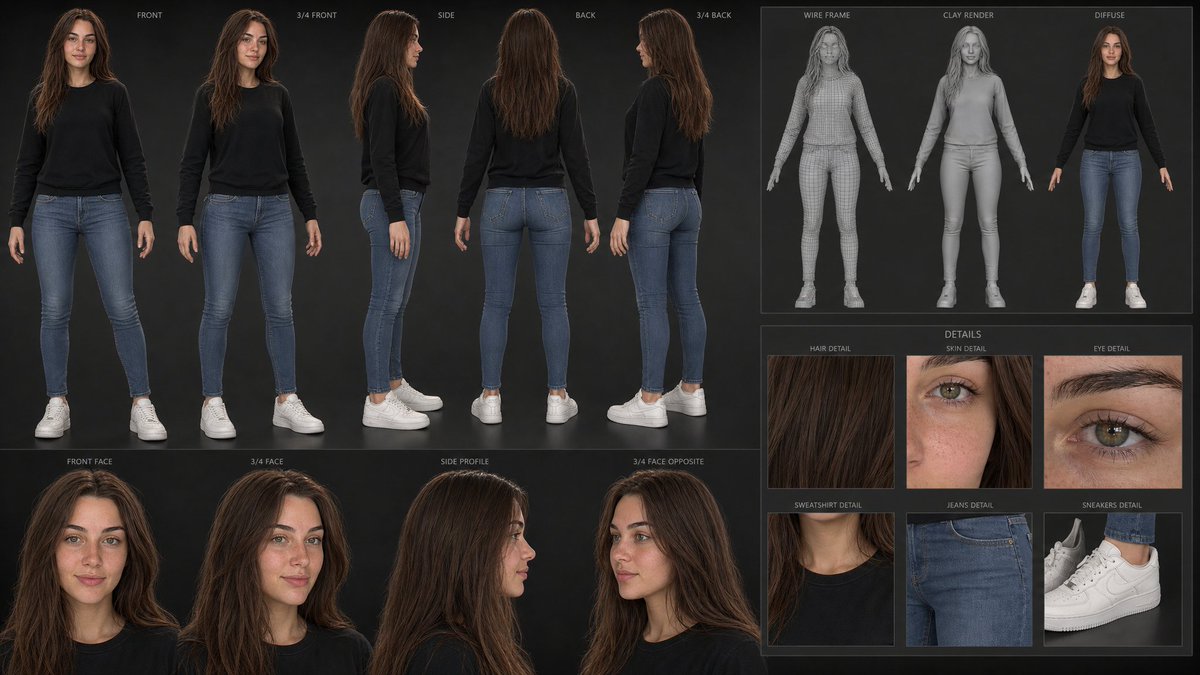
If you want the same character to show up consistently across many images or a whole video, the single most useful thing you can generate is a character reference sheet: one image showing your character from multiple angles, expressions and poses, on a clean background. Feed it back in as a reference and every later shot stays on-model. It is the backbone of AI character work, and our catalog has strong examples across every major model. Here is how the best ones are built.

What a reference sheet is for

A reference sheet (also called a model sheet or character bible) turns a single idea into a reusable asset. Instead of re-describing your character every time and getting a slightly different face, you generate the sheet once and use it as the identity anchor. This is what makes multi-shot storytelling, image-to-video and consistent series work at all.

The strongest examples

  • AAA-quality 3D Character Reference Sheet from a Photo turns one photo into a full game-ready turnaround - the highest-leverage move if you already have a face.
  • Premium Cinematic Character Design Sheet shows the film-production layout: hero pose, callouts, palette.
  • Wispy Moan Character Bible Sheet is a clean "bible" format with named sections.
  • Storm Caller vs Depth Warrior Reference Sheet proves you can sheet two characters in one frame for a matchup.
  • Anime Character Sheet: Time-Loop Short Film and the Anime Storyboard and Character Sheet tie a sheet directly into a story.
  • Patterns that make a sheet actually usable

  • Ask for a grid or turnaround explicitly. "Character reference sheet, front / three-quarter / side / back views on a plain neutral background." Without the layout instruction you get one hero image, not a sheet.
  • Lock identity first. If you start from a photo, add "use the uploaded image as the only identity reference; do not change the face." This is what keeps every angle the same person.
  • Add expression and pose rows. "A row of 5 expressions (neutral, smiling, angry, surprised, sad)" and "3 full-body poses" give you the range you will actually reuse.
  • Name the sections. Layouts with labels (NAME / AGE / palette swatches / prop callouts) read as a real production bible and make the model organize the frame.
  • Keep the background plain. A neutral or single-color backdrop makes the sheet easy to cut and reuse; busy scenes defeat the purpose.
  • Then animate or restyle from it. Once the sheet exists, feed it into a video prompt or a new scene - the image-to-video guide covers the hand-off.
  • Which model

  • [GPT Image 2](/search?model=GPT%20Image%202) and [ChatGPT](/search?model=ChatGPT) handle photo-to-sheet identity transfer cleanly.
  • [Midjourney](/search?model=Midjourney) excels at stylized/illustrated character sheets.
  • [Grok](/search?model=Grok) and [Nano Banana Pro](/search?model=Nano%20Banana%20Pro) are strong for the cinematic "design sheet" look.
  • Browse more in the catalog and run any of these in Create to build your own character, then keep it consistent everywhere.

    Tags
    character-sheet·character-reference·character-design·consistency·gpt-image-2·midjourney·ai-art·guide

    Related Articles