12 top-scoring Grok Imagine prompts from wikiprompt's catalog, covering cinematic portraits, fire and water effects, and emotional-contrast video clips, plus the recipe behind why they work.
Grok Imagine is xAI's image and video generator, built into Grok and designed to take a single text prompt from a still frame straight into a short animated clip. That combination, one model handling both the image and the motion, is what makes it different from most of the generators on this site: a well-built Grok Imagine prompt is really two prompts in one, a scene description and a small piece of direction for how that scene should move.
The prompts collected here come straight from wikiprompt's catalog of Grok Imagine submissions, ranked by our editorial quality score. Some are pure stills; most describe a short cinematic beat, a camera move, or an emotional turn that only makes sense once the clip is playing.
What Grok Imagine is good at
Cinematic lighting and mood. Low-key, high-contrast lighting, moody color grading, and film-noir style portraiture come out consistently strong. Naming a specific look (polarisation study, 1940s noir, cyberpunk rain) does more work than a generic adjective like "moody."Short, self-contained motion. Grok Imagine shines on a single clear beat: an ember catching fire, a hand closing, waves rising inside glass. Avoid multi-shot sequences; describe one motion and let the model finish it.The image and video mix in one workflow. Several of the strongest prompts here render as a still first and only reveal their full craft once you ask for the video pass; the caption below each entry notes whether the prompt is built for a still, a clip, or both.Texture and material detail. Diorama-style miniatures, glass, embers, fur, and rain all read as photoreal when the prompt calls out the material explicitly rather than just naming the subject.Emotional contrast. The prompts that score highest tend to pair two opposing ideas in one frame, monstrous vs. fragile, ancient vs. futuristic, still vs. erupting, and let Grok Imagine render the tension.The best Grok Imagine prompts
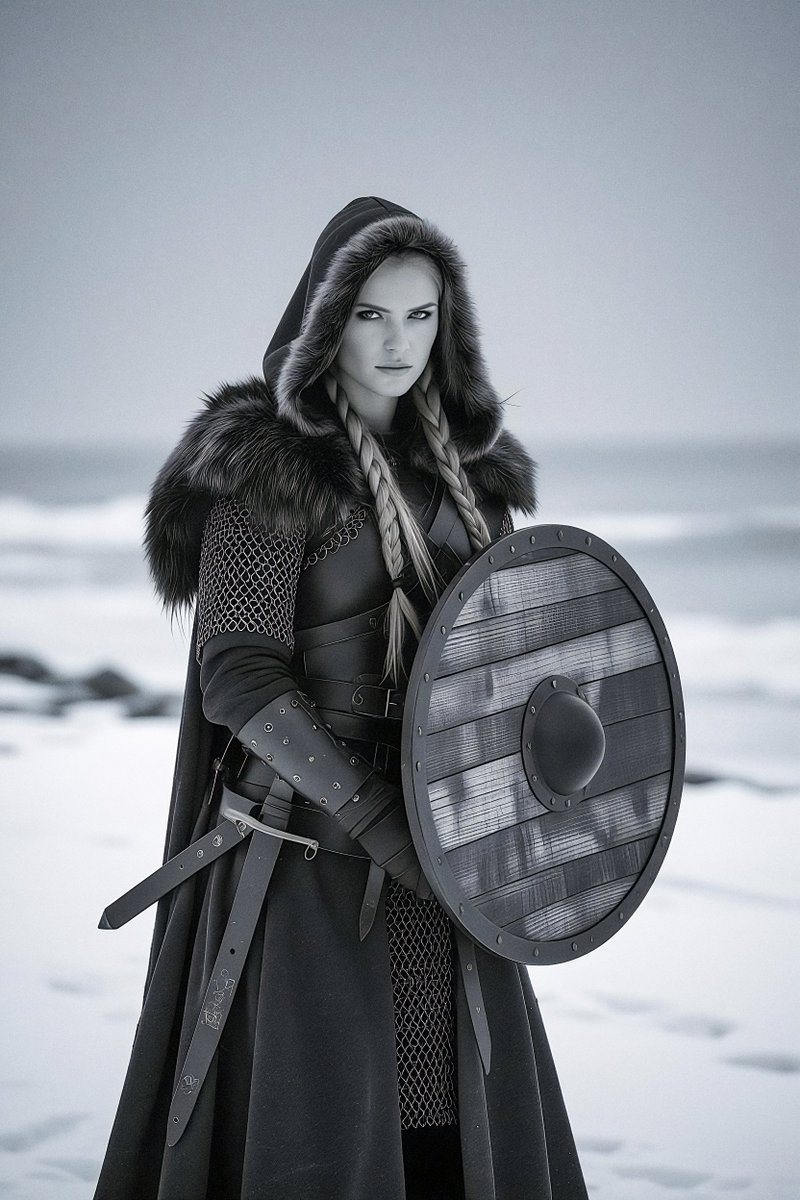
Viking Warrior in Polar Night Low-Key Polarisation Study: a tightly art-directed low-key portrait that leans entirely on lighting language rather than costume detail to sell the scene.Cosmic Divine Hand Monochrome Scene: a single monochrome gesture rendered with enough weight that the video pass turns a still pose into a genuine moment.Cinematic Sprite Can in Surreal Forest: proof that product-style subjects hold up under Grok Imagine's cinematic treatment when the surrounding environment is built out in equal detail.1940s Film Noir Portrait: a clean period reference plus a lighting style is enough to get a convincing noir still without extra qualifiers.Cinematic Cyberpunk Noir Rain Portrait: stacks two aesthetics, cyberpunk and noir, and lets rain and reflected neon carry the motion in the video pass.Monster and Butterfly Emotional Contrast Video Prompt: the clearest example of the emotional-contrast pattern, a single small motion between two opposing subjects driving the whole clip.Miniature Mediterranean Villa Diorama Cinematic Video: a tilt-shift miniature look that depends on naming the diorama scale explicitly, then adding a slow cinematic camera move.Phoenix Rising from Embers - Cinematic Fire Video Prompt: a fire and ember effect built as one continuous motion rather than a sequence of separate beats.Ocean Waves Suspended Inside a Transparent Glass Box: a surreal, physically impossible premise that reads as believable because the material description of the glass and water is so specific.Astral Griffin Celestial Fantasy Portrait: a fantasy creature prompt that pairs celestial lighting cues with a clear silhouette, useful as a template for other mythical-creature portraits.Dark Fantasy Anime Illustration of Asta in Devil Union Form: a strong case study in style-matching, naming the exact anime aesthetic keeps the output on-model instead of generic fantasy art.God's-eye View of a Dormant Titan-Mech Awakening in Sand Dunes: an unusual camera angle, top-down, that most generators struggle with, paired with a slow scale-reveal in the video pass.A quick recipe
Most of the top-scoring prompts on this list share the same underlying structure. Borrow it directly:
Name the subject and its exact style reference. "1940s film noir portrait" or "dark fantasy anime illustration" beats a vague style adjective every time.Describe lighting and material before anything else. Low-key, polarised, monochrome, glass, ember: these words do more to shape the final look than extra scene detail.Pick one camera angle and commit to it. A god's-eye view or a tight portrait framing works better than trying to describe several shots in one prompt.Write the motion as a single beat, not a sequence. A hand closing, a wave rising, an ember catching, that is the right scope for a Grok Imagine video pass.Let contrast do the emotional work. Pairing two opposing ideas, monstrous and fragile, dormant and awakening, ancient and futuristic, is a reliable way to make a still or clip feel like it means something.Browse the full, growing set of Grok Imagine prompts on wikiprompt, or head back to the blog for more prompt roundups.